01 / Capture
Capture
Trigger capture actions on a phone during layer changes, pauses and specific print events.
EVENT → BLE HID
The connected app captures and saves the image.
SnapAzule watches your print, detects important events and connects the printer to devices and automations. Monitor layers, trigger Bluetooth commands, record what happened and follow everything through a local interface. Experimental features and new synchronization techniques are presented openly in the SnapAzule Lab.
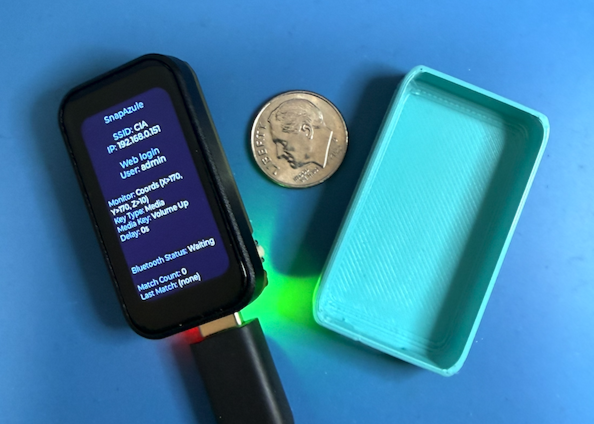
SnapAzule turns 3D printing events into Bluetooth actions and useful data for following and diagnosing the whole process.
Trigger capture actions on a phone during layer changes, pauses and specific print events.
EVENT → BLE HID
The connected app captures and saves the image.
Follow the current layer, connections, active mode, events and print state on the touch screen and local web panel.
MQTT ONLINE · LAYER 042
BLE CONNECTED · diagnostic state
Turn MQTT, G-code, coordinates and pauses into Bluetooth HID commands for compatible phones, computers and software.
MQTT · G-CODE · XYZ → BLE
The target must accept the configured shortcut.
Inspect latency, reconnects, duplicates, losses, queues and failures to understand how the system behaved.
MQTT_RX · QUEUE_IN · BLE_RESULT
LATENCY · failure traces
Physical synchronization, IMU, vibration, Digital Twin and Precision Pause remain under research and validation in the SnapAzule Lab.
We publish what has been tested, what is currently being validated and what still needs evidence. SnapAzule is not presented as compatible with every printer or phone.
The Bambu A1 is the initial printer platform used for the main timelapse workflow and first validation runs.
These paths are being tested model by model. Results can change with firmware, profiles and the exact event sequence.
Other printers, phones and software may work, but they are not declared compatible until we have repeatable evidence.
The same touch controller that triggers a camera can also act as a local dashboard, Bluetooth remote, flight recorder and gateway for your own workflows.
Send Volume +/−, Play/Pause, Mute, Enter, Space or a custom keycode to a phone, computer, OBS or another shortcut-driven tool.
Keep the active mode, layer, connection state and latest event visible on the local touch screen while the printer works.
Save reconnects, raw MQTT events, queue depth, latency, BLE results and failures to CSV or JSONL on the SD card.
Photograph a specific layer, height, coordinate, pause, start or finish to document how a part was made.
Turn MQTT, HTTP or G-code events into actions for scripts, media software and other systems on your local network.
Use the integrated IMU to study park, movement, impact and abnormal patterns. This remains experimental research.
Where we test new ways to observe, synchronize and automate 3D printers. Real experiments, open results and documented limitations. Research technologies are not presented as ready features until they are validated.
The Lab is designed to publish continuous footage and comparisons: correct captures, motion blur, BLE delay, MQTT reconnects, synchronization failures and before/after changes.
Plug the SnapAzule into any computer, open shop.snapazule.com in Chrome or Edge, and click Flash. About 30 seconds.
BLE‑HID targets can include an iPhone camera, a DSLR app, an OBS hotkey or a laptop — when the specific setup accepts the configured key. Compatibility is validated per model.
Choose a tile on the touch screen — G‑code, layer, coordinate, incremental — and press Start. SnapAzule takes it from there.
Point the keystroke at whatever app actually presses the shutter — iPhone Camera, a DSLR tether, an OBS hotkey, a macro recorder on your laptop. SnapAzule is the trigger; you pick the camera.
Free download with a $0 minimum · contribute any amount if you want to support the project
Download firmware — $0+